Framer vs. Webflow for Startup Websites
Both platforms can build a great startup website. The right choice depends on what your company actually needs right now, not which tool has more features.

8 min read
Copy URL
Copied!
If you are a startup founder or head of marketing choosing between Framer and Webflow, you have probably read a dozen comparison articles already. They all say some version of the same thing: Framer is better for design, Webflow is better for CMS, it depends on your needs.
That is not wrong, but it is not useful either. This is a comparison written specifically for venture-backed startups building or rebuilding a marketing website. Not an e-commerce store, not a content hub with 10,000 blog posts. A marketing site that needs to look great, communicate clearly, load fast, and allow for quick iteration.
Overview
Framer
Framer is a visual website builder with a Figma-like editing experience. You design directly on the canvas and publish without writing code. It started as a prototyping tool and has evolved into a full site builder, with a built-in CMS, animations, responsive design controls, and the ability to extend functionality through React code components and overrides.
It is particularly popular with design-focused teams, agencies, and early-stage startups that prioritize speed and visual quality.
Webflow
Webflow is a visual development platform that generates clean HTML, CSS, and JavaScript. It uses a CSS-based editor that gives you granular control over layout, styling, and responsive behavior. Its CMS is significantly more mature, and it supports native e-commerce, advanced SEO controls, and enterprise features like SOC 2 compliance and SSO.
It is widely adopted by agencies, marketing teams, and content-heavy businesses that need structure and scalability.
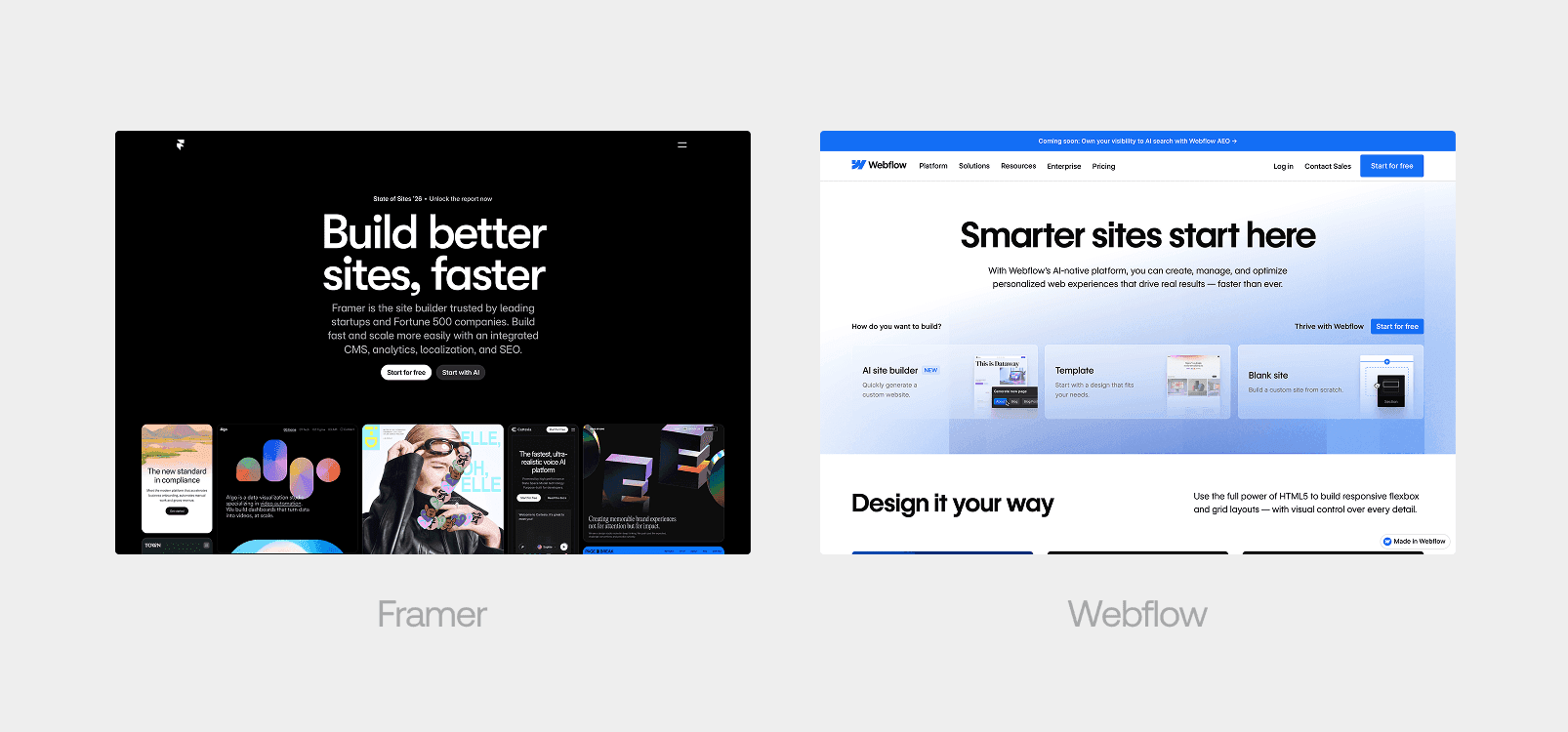
Design and visual quality
Both platforms can produce visually strong websites, the difference is in how you get there.
Framer's editor feels like working in a design tool. There is no learning CSS concepts or understanding the box model. You place elements on a canvas, style them visually, and the result is what you see. For a startup that needs a polished marketing site, this means faster execution and easier updates down the line, even for non-technical team members.
Webflow gives you more fine-grained control over CSS, which some developers prefer and can be valuable for complex layouts and precise responsive behavior. But it comes with a steeper learning curve and slower iteration speed, which matters when timelines are tight.
Animations and interactions
Both platforms support animations, but they approach them differently.
Framer treats motion as a first-class feature. Scroll-triggered animations, page transitions, hover effects, and parallax are all built into the visual editor. You configure them without code, and they use GPU-accelerated CSS transforms for smooth performance. For more complex interactions, you can write code overrides using the full Motion for React API.
Webflow's Interactions 2.0 system is powerful and precise, especially with its GSAP integration. It offers more granular control over animation timing and sequencing, though the configuration process is more technical. Both platforms can produce equally impressive results.
For a startup that wants a site with modern, polished motion design without a dedicated developer, Framer is the faster and more intuitive choice.
Interactive demo developed for V7 Labs, built in Framer.
CMS
This is where Webflow is stronger, and it is not close for large-scale content operations.
Webflow supports up to 20,000 CMS items on its Premium plan (with add-ons scaling further), multiple collections with custom fields, reference and multi-reference fields for relational content, and advanced filtering and sorting. It is a serious content management system.
Framer's CMS has improved significantly, with CMS 3.0 introducing better collection management, conditional visibility, deep filtering, and up to 100,000 items on higher plans. For a startup website with a handful of posts, case studies, and a team page, Framer handles that without friction.
But if you are building a content engine with hundreds of articles, multiple authors, categories, regions, and complex relational content, Webflow's CMS is the more mature and reliable choice.
SEO
Both platforms cover the fundamentals: custom meta titles and descriptions, Open Graph tags, XML sitemaps, clean URLs, and SSL.
Webflow goes further with AI-assisted schema markup generation, structured data controls, and its new AEO (coming soon) tools designed for AI search visibility. For content-heavy sites where SEO is a primary growth channel, Webflow has more depth.
Framer supports custom code injection, which means you can add schema markup, tracking scripts, and any SEO-related code manually. You can achieve strong SEO results on Framer, but it requires more hands-on work for advanced configurations.
For a startup marketing site where SEO matters but is not the sole growth strategy, both platforms perform well. Framer requires a bit more manual setup for advanced SEO, but nothing that would hold a startup back.
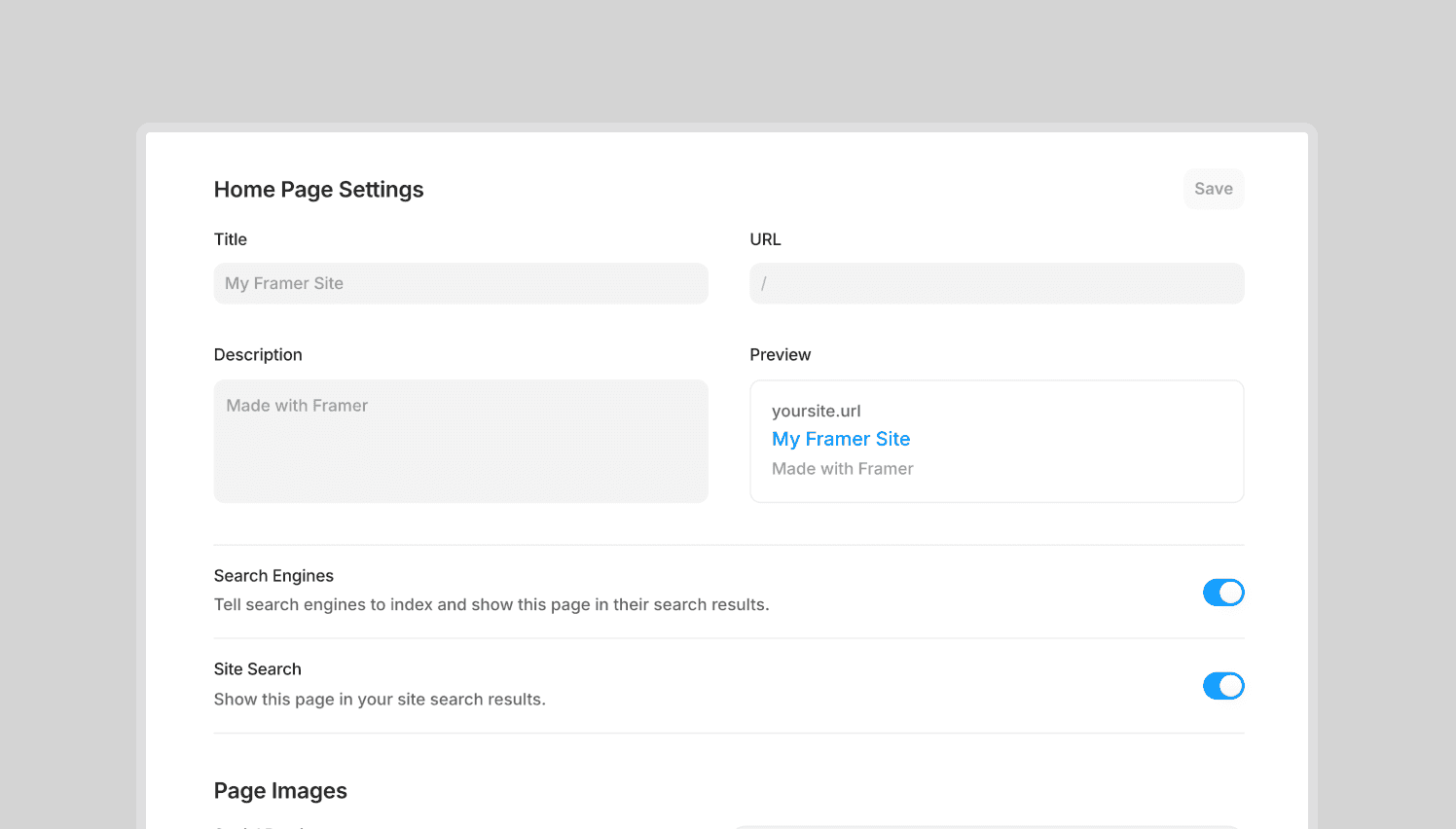
Framer's SEO settings
Speed to launch
Framer is significantly faster.
The Figma-like editor means designers can build production-ready pages without a handoff process. There is no translation layer between design and development. What you see on the canvas is what publishes. For a startup on a tight timeline, this can mean the difference between launching in weeks rather than months.
Webflow's more structured approach means more setup time, especially for teams unfamiliar with CSS concepts. The tradeoff is that the underlying structure tends to be more rigidly organized, which can be beneficial for long-term maintenance on complex sites.
For startups that need to move fast, ship, and iterate, Framer's speed advantage is meaningful.
Pricing
Both platforms offer free tiers for testing.
Framer's paid plans start at $5/month (Basic) for basic sites, with Pro at $30/month being the plan most startups will use. The Pro plan includes custom domains, CMS, analytics, and full publishing capabilities.
Webflow's new simplified pricing (as of May 2026) starts at $15/month (Basic) for static sites. The Premium plan at $25/month (annual) is the standard choice for sites with CMS needs, including 20,000 CMS items. Workspace plans for team collaboration are separate and add to the cost.
For a startup working with a design studio on a marketing website, total cost of ownership is comparable. The pricing difference alone should not drive this decision.
E-commerce
Webflow has native e-commerce with product management, checkout, and payment processing built in. Framer does not have native built-in e-commerce/checkout in the same way Webflow does, though Shopify integration plugins exist.
For a SaaS startup, this is usually irrelevant. You are not selling products through your marketing site. You are driving signups, demo requests, and investor confidence.
Extensibility
Framer lets you write custom React components and code overrides, giving you an escape hatch when the visual editor is not enough. You can build WebGL effects, custom animations, API integrations, and anything React can do, directly inside a Framer project.
Webflow allows custom code embeds and has a growing marketplace of native integrations (HubSpot, Memberstack, Zapier, Airtable). Its API allows external CMS management. For enterprise workflows and complex integrations, Webflow's ecosystem is broader.
When Webflow is the better choice | When Framer is the better choice |
|---|---|
A content-heavy site with hundreds of CMS items and complex relational content | A visually polished marketing site that ships fast |
Native e-commerce | Smooth, modern animations without a dedicated developer |
Enterprise compliance requirements (SOC 2, SSO) | Custom interactive elements built with React |
A marketing team that will manage and publish content independently at scale | A design-first workflow where the team can build and iterate directly on the canvas |
Advanced SEO and AEO tooling as a primary growth lever | A small CMS for blog posts, case studies, and team pages |
The startup-specific answer
By now you know both platforms are extremely powerful. The question is which one fits where your startup is right now.
For a venture-backed SaaS startup building a marketing website, Framer is usually the better fit. What matters at this stage is visual quality, speed to launch, and the ability to iterate quickly. You are not building a content engine, you are building a site that needs to make your company feel credible and your story feel clear.
Webflow has more features, more depth, and more enterprise capability. But those strengths solve problems that most startups do not have yet. Choosing a tool for problems you might have in two years is how startups end up over-engineered and under-launched.
Build for where you are. If your needs outgrow Framer, you will know, and migrating to a more complex platform at that point is a good problem to have.
Frequently asked questions
Is Framer a good choice for a startup website?
Yes. Framer is used by startups and Fortune 500 companies for production marketing sites. Its CMS, animation tools, and responsive design capabilities handle everything a typical startup marketing site requires.
Is Webflow better for SEO than Framer?
Webflow has more advanced native SEO tools, including auto-generated schema and AEO features. But both platforms support the fundamentals well. For a startup marketing site, the SEO difference is manageable with manual setup on Framer.
Can I migrate from Framer to Webflow later?
Yes, though it requires rebuilding the site since the platforms use different underlying systems. This is a standard process if your needs evolve significantly.
Do I need a developer to build a Framer site?
Not for a standard marketing site. Framer's visual editor handles layout, styling, CMS, and animations without code. A developer is only needed for custom interactive elements or complex integrations.
Which platform loads faster?
Both perform well. Framer uses a global CDN with strong default performance. Webflow generates clean, minified code with automatic asset compression. Real-world performance depends more on how the site is built than which platform hosts it.
If you are a startup founder or head of marketing choosing between Framer and Webflow, you have probably read a dozen comparison articles already. They all say some version of the same thing: Framer is better for design, Webflow is better for CMS, it depends on your needs.
That is not wrong, but it is not useful either. This is a comparison written specifically for venture-backed startups building or rebuilding a marketing website. Not an e-commerce store, not a content hub with 10,000 blog posts. A marketing site that needs to look great, communicate clearly, load fast, and allow for quick iteration.
Overview
Framer
Framer is a visual website builder with a Figma-like editing experience. You design directly on the canvas and publish without writing code. It started as a prototyping tool and has evolved into a full site builder, with a built-in CMS, animations, responsive design controls, and the ability to extend functionality through React code components and overrides.
It is particularly popular with design-focused teams, agencies, and early-stage startups that prioritize speed and visual quality.
Webflow
Webflow is a visual development platform that generates clean HTML, CSS, and JavaScript. It uses a CSS-based editor that gives you granular control over layout, styling, and responsive behavior. Its CMS is significantly more mature, and it supports native e-commerce, advanced SEO controls, and enterprise features like SOC 2 compliance and SSO.
It is widely adopted by agencies, marketing teams, and content-heavy businesses that need structure and scalability.
Design and visual quality
Both platforms can produce visually strong websites, the difference is in how you get there.
Framer's editor feels like working in a design tool. There is no learning CSS concepts or understanding the box model. You place elements on a canvas, style them visually, and the result is what you see. For a startup that needs a polished marketing site, this means faster execution and easier updates down the line, even for non-technical team members.
Webflow gives you more fine-grained control over CSS, which some developers prefer and can be valuable for complex layouts and precise responsive behavior. But it comes with a steeper learning curve and slower iteration speed, which matters when timelines are tight.
Animations and interactions
Both platforms support animations, but they approach them differently.
Framer treats motion as a first-class feature. Scroll-triggered animations, page transitions, hover effects, and parallax are all built into the visual editor. You configure them without code, and they use GPU-accelerated CSS transforms for smooth performance. For more complex interactions, you can write code overrides using the full Motion for React API.
Webflow's Interactions 2.0 system is powerful and precise, especially with its GSAP integration. It offers more granular control over animation timing and sequencing, though the configuration process is more technical. Both platforms can produce equally impressive results.
For a startup that wants a site with modern, polished motion design without a dedicated developer, Framer is the faster and more intuitive choice.
Interactive demo developed for V7 Labs, built in Framer.
CMS
This is where Webflow is stronger, and it is not close for large-scale content operations.
Webflow supports up to 20,000 CMS items on its Premium plan (with add-ons scaling further), multiple collections with custom fields, reference and multi-reference fields for relational content, and advanced filtering and sorting. It is a serious content management system.
Framer's CMS has improved significantly, with CMS 3.0 introducing better collection management, conditional visibility, deep filtering, and up to 100,000 items on higher plans. For a startup website with a handful of posts, case studies, and a team page, Framer handles that without friction.
But if you are building a content engine with hundreds of articles, multiple authors, categories, regions, and complex relational content, Webflow's CMS is the more mature and reliable choice.
SEO
Both platforms cover the fundamentals: custom meta titles and descriptions, Open Graph tags, XML sitemaps, clean URLs, and SSL.
Webflow goes further with AI-assisted schema markup generation, structured data controls, and its new AEO (coming soon) tools designed for AI search visibility. For content-heavy sites where SEO is a primary growth channel, Webflow has more depth.
Framer supports custom code injection, which means you can add schema markup, tracking scripts, and any SEO-related code manually. You can achieve strong SEO results on Framer, but it requires more hands-on work for advanced configurations.
For a startup marketing site where SEO matters but is not the sole growth strategy, both platforms perform well. Framer requires a bit more manual setup for advanced SEO, but nothing that would hold a startup back.
Framer's SEO settings
Speed to launch
Framer is significantly faster.
The Figma-like editor means designers can build production-ready pages without a handoff process. There is no translation layer between design and development. What you see on the canvas is what publishes. For a startup on a tight timeline, this can mean the difference between launching in weeks rather than months.
Webflow's more structured approach means more setup time, especially for teams unfamiliar with CSS concepts. The tradeoff is that the underlying structure tends to be more rigidly organized, which can be beneficial for long-term maintenance on complex sites.
For startups that need to move fast, ship, and iterate, Framer's speed advantage is meaningful.
Pricing
Both platforms offer free tiers for testing.
Framer's paid plans start at $5/month (Basic) for basic sites, with Pro at $30/month being the plan most startups will use. The Pro plan includes custom domains, CMS, analytics, and full publishing capabilities.
Webflow's new simplified pricing (as of May 2026) starts at $15/month (Basic) for static sites. The Premium plan at $25/month (annual) is the standard choice for sites with CMS needs, including 20,000 CMS items. Workspace plans for team collaboration are separate and add to the cost.
For a startup working with a design studio on a marketing website, total cost of ownership is comparable. The pricing difference alone should not drive this decision.
E-commerce
Webflow has native e-commerce with product management, checkout, and payment processing built in. Framer does not have native built-in e-commerce/checkout in the same way Webflow does, though Shopify integration plugins exist.
For a SaaS startup, this is usually irrelevant. You are not selling products through your marketing site. You are driving signups, demo requests, and investor confidence.
Extensibility
Framer lets you write custom React components and code overrides, giving you an escape hatch when the visual editor is not enough. You can build WebGL effects, custom animations, API integrations, and anything React can do, directly inside a Framer project.
Webflow allows custom code embeds and has a growing marketplace of native integrations (HubSpot, Memberstack, Zapier, Airtable). Its API allows external CMS management. For enterprise workflows and complex integrations, Webflow's ecosystem is broader.
When Webflow is the better choice | When Framer is the better choice |
|---|---|
A content-heavy site with hundreds of CMS items and complex relational content | A visually polished marketing site that ships fast |
Native e-commerce | Smooth, modern animations without a dedicated developer |
Enterprise compliance requirements (SOC 2, SSO) | Custom interactive elements built with React |
A marketing team that will manage and publish content independently at scale | A design-first workflow where the team can build and iterate directly on the canvas |
Advanced SEO and AEO tooling as a primary growth lever | A small CMS for blog posts, case studies, and team pages |
The startup-specific answer
By now you know both platforms are extremely powerful. The question is which one fits where your startup is right now.
For a venture-backed SaaS startup building a marketing website, Framer is usually the better fit. What matters at this stage is visual quality, speed to launch, and the ability to iterate quickly. You are not building a content engine, you are building a site that needs to make your company feel credible and your story feel clear.
Webflow has more features, more depth, and more enterprise capability. But those strengths solve problems that most startups do not have yet. Choosing a tool for problems you might have in two years is how startups end up over-engineered and under-launched.
Build for where you are. If your needs outgrow Framer, you will know, and migrating to a more complex platform at that point is a good problem to have.
Frequently asked questions
Is Framer a good choice for a startup website?
Yes. Framer is used by startups and Fortune 500 companies for production marketing sites. Its CMS, animation tools, and responsive design capabilities handle everything a typical startup marketing site requires.
Is Webflow better for SEO than Framer?
Webflow has more advanced native SEO tools, including auto-generated schema and AEO features. But both platforms support the fundamentals well. For a startup marketing site, the SEO difference is manageable with manual setup on Framer.
Can I migrate from Framer to Webflow later?
Yes, though it requires rebuilding the site since the platforms use different underlying systems. This is a standard process if your needs evolve significantly.
Do I need a developer to build a Framer site?
Not for a standard marketing site. Framer's visual editor handles layout, styling, CMS, and animations without code. A developer is only needed for custom interactive elements or complex integrations.
Which platform loads faster?
Both perform well. Framer uses a global CDN with strong default performance. Webflow generates clean, minified code with automatic asset compression. Real-world performance depends more on how the site is built than which platform hosts it.
We design and build Framer marketing sites for startups that need to ship fast and stand out.

