Is Framer Good for SEO? What Startups Need to Know
Here is what Framer actually handles, where you need to step in, and why most ranking problems have nothing to do with Framer itself.

8 min read
Copy URL
Copied!
If you are building or redesigning your startup's website in Framer, SEO is probably somewhere on your list of concerns. You have heard that Framer is great for design but maybe not as strong for search. Or you have seen conflicting advice from other vendors pushing their solutions.
Here is the short answer: Framer is good for SEO. For a startup marketing site with a handful of pages, a blog, and some case studies, it covers everything you need. The sites that struggle to rank are actually struggling because of missing content strategy, poor structure, or skipped manual setup that takes less than an hour.
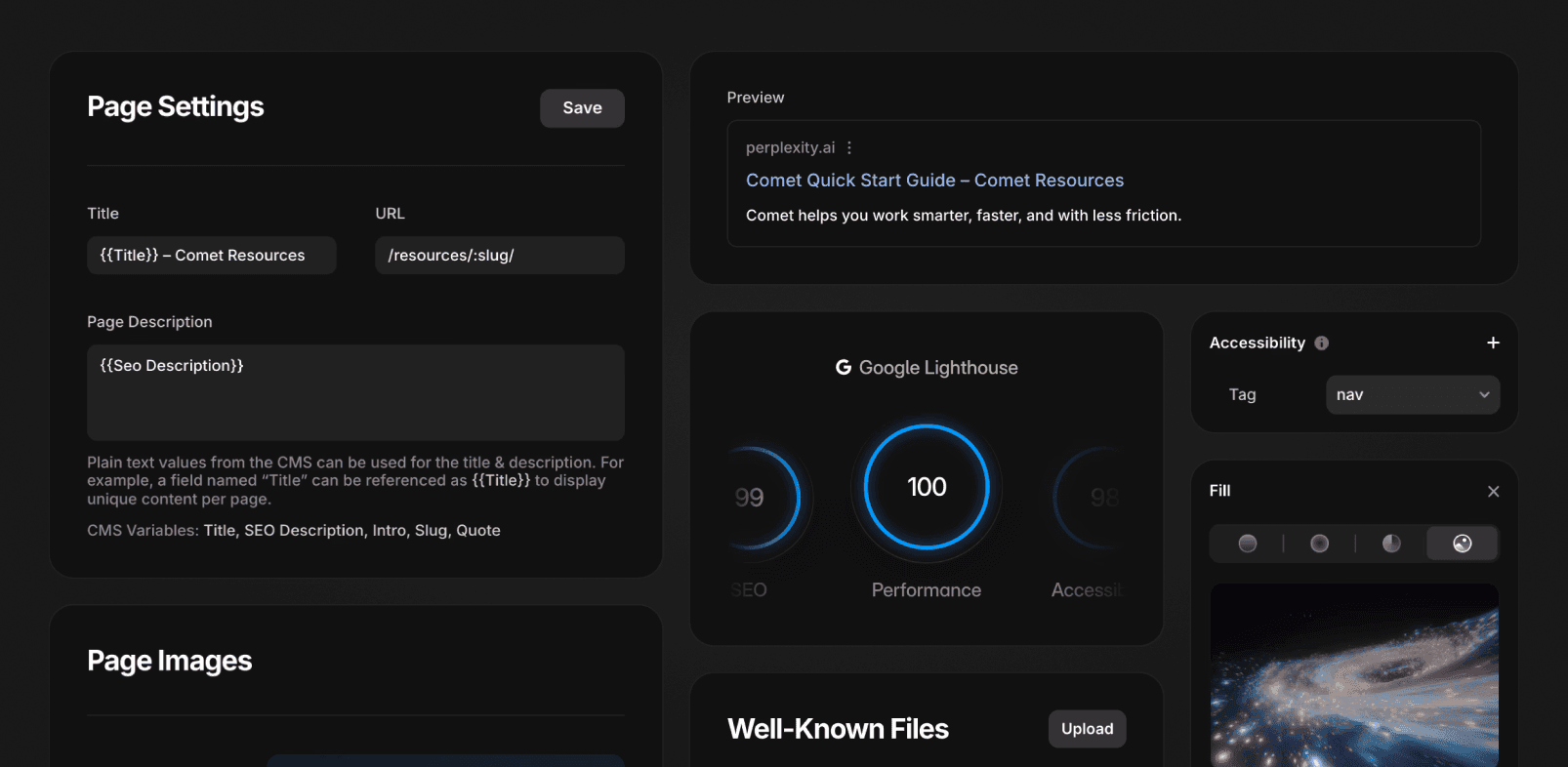
Framer's built-in SEO features (Source: Framer)
What works out of the box
Framer websites ship with a solid SEO foundation that requires zero configuration.
Server-side rendering. Framer delivers pre-rendered HTML to the browser, which means search engines can read your content without executing JavaScript. This is critical for crawlability and indexing.
Automatic sitemaps. Framer generates and maintains an XML sitemap for every published site. It updates automatically when you add or change pages.
Robots.txt. Generated automatically for every published site. On Pro plans and above, you can upload a custom
robots.txtfile if needed.SSL and clean URLs. Every Framer site runs on HTTPS with clean, readable URLs by default.
Image optimization. Framer automatically converts images to AVIF (the most efficient format available), generates multiple sizes for different devices, and serves the most appropriate version based on the visitor's screen. You do not need to resize or compress images before uploading.
Font optimization. Framer handles font loading with font-display: swap, WOFF2 compression, and layout shift optimization to prevent text from shifting as fonts load.
Core Web Vitals. Framer sites generally perform well on Core Web Vitals out of the box. Pages are served from a global CDN with HTTP/3, and the rendering pipeline is optimized for fast initial loads.
For context: Core Web Vitals are the performance metrics Google actually uses for rankings. PageSpeed Insights scores, which many founders obsess over, do not directly affect SEO and might not reflect actual user experience. They are a diagnostic tool, not a ranking signal.
What needs manual setup
This is where Framer requires some hands-on work. None of it is hard, but skipping it is where sites quietly lose search visibility.
Meta titles and descriptions
Framer lets you set custom meta titles and descriptions on every page, including CMS-driven pages where you can use dynamic variables. This means each blog post or case study can have its own unique metadata pulled directly from your CMS fields.
The setup is simple, but you need to actually do it. Default or missing metadata is one of the most common SEO problems on Framer sites.
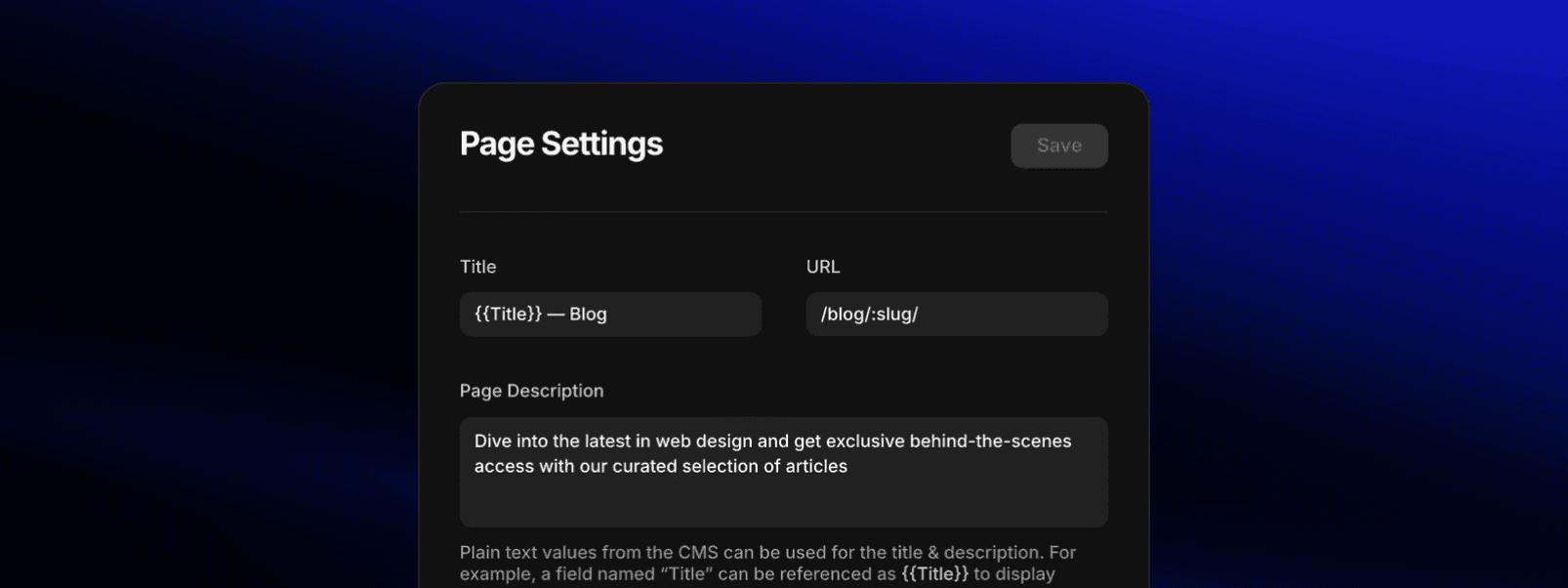
Framer's page settings (Source: Framer)
Schema markup
Framer does not generate structured data (JSON-LD) automatically. If you want Organization schema, Article schema, FAQPage schema, or any other structured data, you need to add it manually through the custom code panel.
Schema helps search engines and AI systems understand what your content is and how to display it. For a startup blog, Article and FAQPage schema can qualify your pages for rich results in Google and make your content more likely to be cited by AI search tools like ChatGPT and Perplexity.
The process is straightforward: you write the JSON-LD, paste it into the custom code section (site-wide or page-specific), and publish. For CMS pages, you can use Framer variables to populate the schema dynamically.
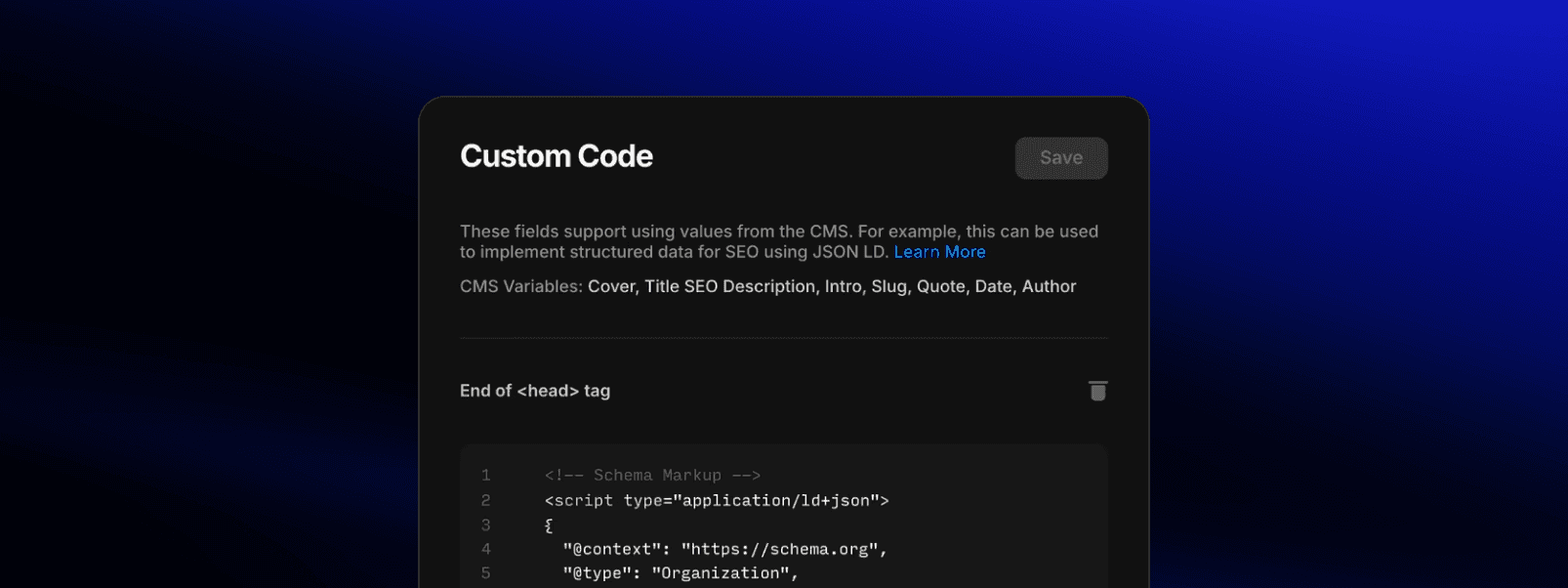
Framer's custom code settings (Source: Framer)
Redirects
Framer has built-in 301 redirect management available on the Pro plan and above. You set them up in Site Settings under Redirects. This is essential when redesigning a site, changing URL structures, or migrating from another platform. Missing redirects during a migration is one of the fastest ways to lose existing search equity.
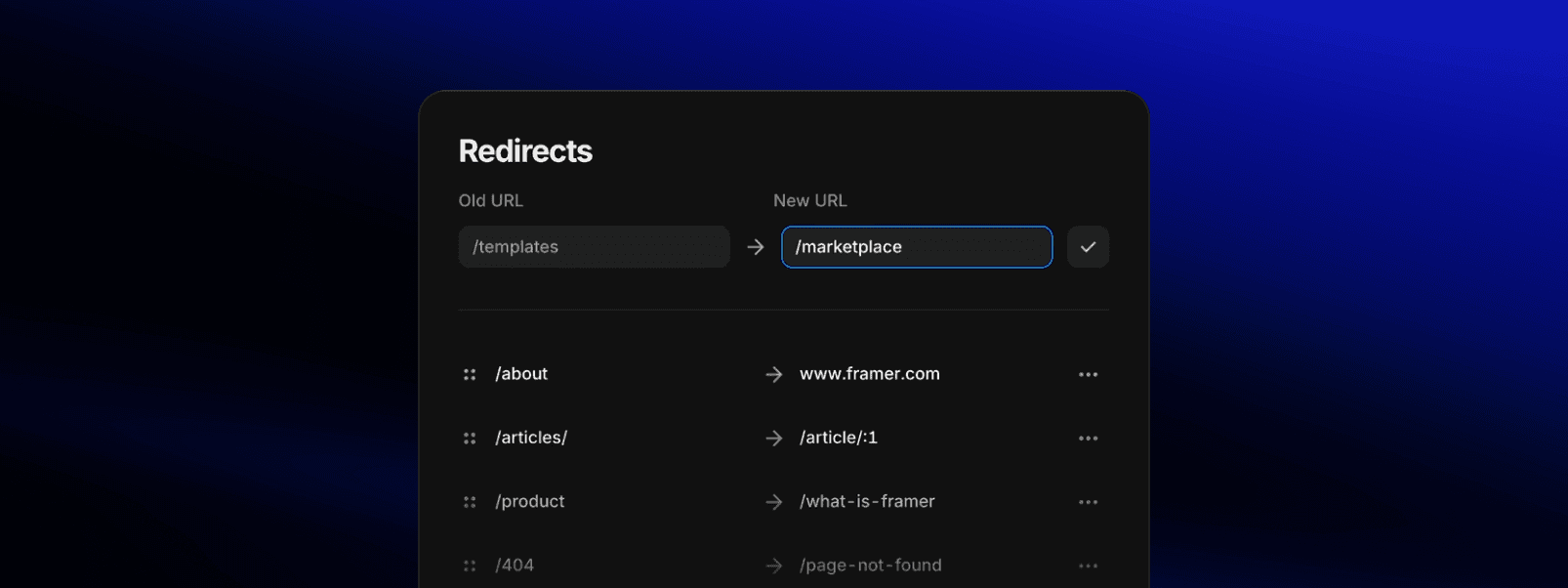
Framer's redirects panel (Source: Framer)
Static files
On the Pro plan and above, Framer allows you to upload static files like robots.txt and llms.txt. These files provide instructions and metadata that help automated systems understand how to access and interpret a website's content.
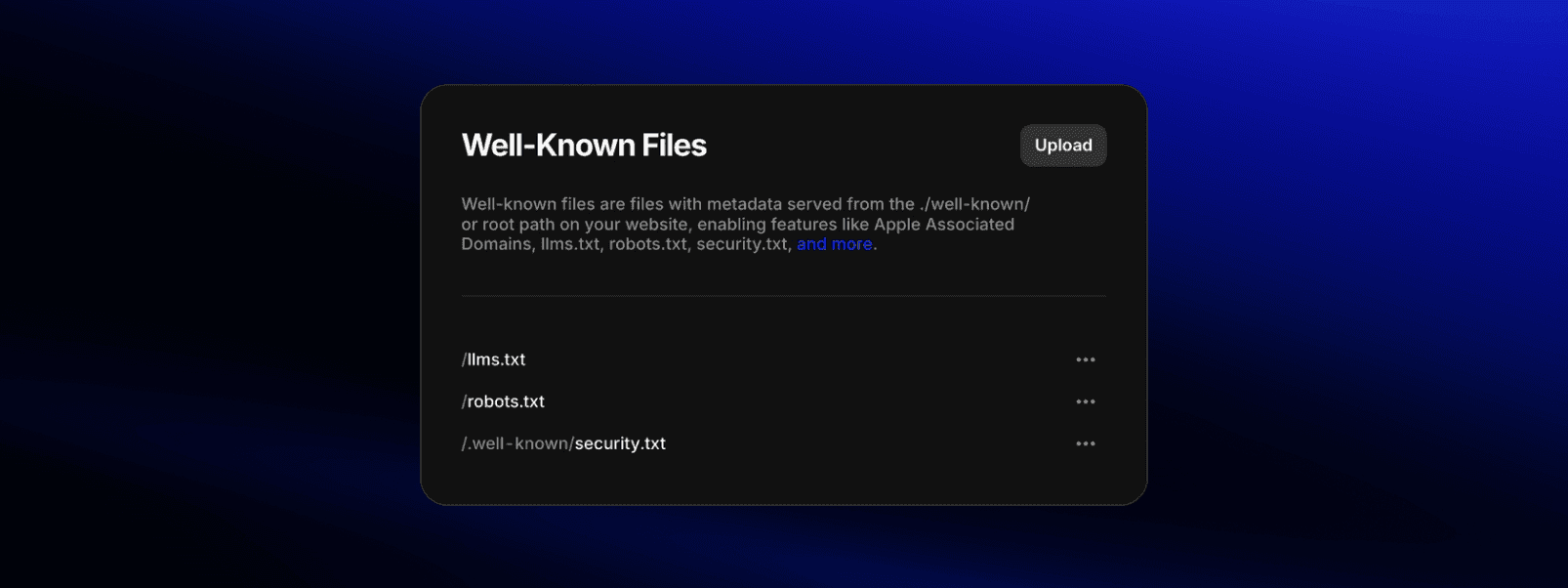
Framer's well-known files (Source: Framer)
What can hurt performance
Framer's default performance is strong, but certain choices can undermine it.
Heavy animations. Complex scroll-triggered animations, parallax effects, and WebGL elements can increase Cumulative Layout Shift (CLS) and slow down rendering, especially on mobile. Use motion intentionally, not decoratively.
Unoptimized video. Framer serves uploaded videos at their original resolution. A 4K video will load in full on a mobile screen. For better performance, use a CDN or YouTube/Vimeo embeds which adapt quality based on the viewer's connection, or compress videos before uploading. Keep looping background videos under 5 MB.
Third-party scripts. Analytics tools, chat widgets, and marketing scripts all add weight. Only load scripts on the pages that need them, and use defer or async attributes to prevent them from blocking page rendering.
Overlay navigation. Content inside Framer overlays is not rendered on initial page load, which means search engines cannot crawl it. If your navigation menu is built entirely as an overlay, the links inside it will not be discovered by Google. Make sure important navigation links exist in the visible page layout or footer as well.
CMS and content SEO
Framer's CMS handles the content needs of a typical startup site comfortably. Blog posts, case studies, team pages, and documentation all work well within the system.
Each CMS item can have its own meta title, description, and URL slug through dynamic variables. This means your blog posts can have unique, optimized metadata without manual page-by-page setup once the template is configured.
For a startup with up to 50 pages and a growing blog, Framer's CMS is more than enough. If you are building a content engine with hundreds of articles, complex taxonomies, and multiple authors, Webflow or WordPress will give you more depth.
AI search visibility
In 2026, ranking on Google is only part of the picture. AI search is growing fast, and tools like ChatGPT, Perplexity, and Claude are becoming a primary way people research products and evaluate companies.

Your site needs to be readable and citable by these systems as well. To improve your chances:
Structure content around clear answers. Open each section with a direct answer to the question it addresses. AI systems extract these directly into their responses.
Use FAQ sections. Structured Q&A content is one of the most commonly cited formats by AI models. Incorporate them naturally into blog posts and key landing pages.
Use identity and product schema. While LLMs read raw text, they rely on structured data (like Organization, Product, and Author schema) to verify your site's authority. This connects your content to trusted "entities" in the AI’s knowledge base, making it more likely to be cited as a trusted source.
Upload an llms.txt file. This tells AI crawlers which pages on your site are the most important sources of information. Worth noting that this file is still considered experimental rather than a universal web requirement. That said, it is worth setting up as a "just in case" low-hanging fruit.
Build off-page brand authority. AI models cross-reference information. To be cited as a top recommendation, your brand needs to be mentioned positively on third-party sites, review platforms, and industry publications that these models ingest.
Where Framer falls short
Knowing the platform's limitations is important because it helps you plan around them.
No built-in SEO auditing. Framer does not have a native checker that flags missing H1s, thin content, or missing alt text. However, third-party Framer plugins can fill this gap directly within the editor. You can also run checks through external tools like Ahrefs or Screaming Frog.
No native keyword tracking. Impressions, clicks, and ranking positions live in Google Search Console, not in Framer. That said, setting up Search Console takes five minutes, and monitoring it regularly is a best practice for any website regardless of which platform you use.
Schema requires manual work. Every type of structured data needs to be written and injected by hand. This is manageable for a small site but becomes time-consuming at scale.
Overlay crawlability. As mentioned, content in overlays is invisible to search engines. This is a design constraint you need to plan around.
None of these are dealbreakers for a startup marketing site. They are simply areas where you need to be deliberate rather than relying on the platform to handle it for you.
The bottom line
For a venture-backed startup building a marketing website, Framer is a strong choice for SEO. The technical foundation is solid, the performance is competitive, and the gaps are manageable with a small amount of manual setup.
The sites that rank on Framer are the ones that pair a well-built site with a real content strategy: targeted keywords, useful content, proper metadata, internal linking, and structured data.
If you are choosing between Framer and another platform based on SEO alone, the difference is marginal. Choose based on which one fits where your startup is right now and lets you build the best site fastest.
Frequently asked questions
Is Framer good for SEO in 2026?
Yes. Framer handles server-side rendering, automatic sitemaps, image optimization, and clean URLs out of the box. The main gap is schema markup, which requires manual setup but takes less than an hour for a typical startup site.
Does Framer hurt site speed and Core Web Vitals?
Not by default. Framer sites perform well on Core Web Vitals. Performance issues usually come from heavy animations, unoptimized video, or too many third-party scripts, not from the platform itself.
Can Framer sites rank on Google?
Yes. Framer sites can and do rank competitively. Rankings depend on content quality, keyword targeting, backlinks, and technical setup, the same factors that matter on any platform.
Does Framer support schema markup?
Yes, via custom code. You add structured data manually through the custom code panel using JSON-LD. This includes Organization, Article, FAQPage, and any other schema type you need.
How does Framer compare to Webflow for SEO?
Webflow has more advanced native SEO tooling, including auto-generated schema and AEO features. Framer requires more manual setup for advanced SEO but covers the fundamentals equally well. For a startup marketing site, the difference is marginal.
If you are building or redesigning your startup's website in Framer, SEO is probably somewhere on your list of concerns. You have heard that Framer is great for design but maybe not as strong for search. Or you have seen conflicting advice from other vendors pushing their solutions.
Here is the short answer: Framer is good for SEO. For a startup marketing site with a handful of pages, a blog, and some case studies, it covers everything you need. The sites that struggle to rank are actually struggling because of missing content strategy, poor structure, or skipped manual setup that takes less than an hour.
Framer's built-in SEO features (Source: Framer)
What works out of the box
Framer websites ship with a solid SEO foundation that requires zero configuration.
Server-side rendering. Framer delivers pre-rendered HTML to the browser, which means search engines can read your content without executing JavaScript. This is critical for crawlability and indexing.
Automatic sitemaps. Framer generates and maintains an XML sitemap for every published site. It updates automatically when you add or change pages.
Robots.txt. Generated automatically for every published site. On Pro plans and above, you can upload a custom
robots.txtfile if needed.SSL and clean URLs. Every Framer site runs on HTTPS with clean, readable URLs by default.
Image optimization. Framer automatically converts images to AVIF (the most efficient format available), generates multiple sizes for different devices, and serves the most appropriate version based on the visitor's screen. You do not need to resize or compress images before uploading.
Font optimization. Framer handles font loading with font-display: swap, WOFF2 compression, and layout shift optimization to prevent text from shifting as fonts load.
Core Web Vitals. Framer sites generally perform well on Core Web Vitals out of the box. Pages are served from a global CDN with HTTP/3, and the rendering pipeline is optimized for fast initial loads.
For context: Core Web Vitals are the performance metrics Google actually uses for rankings. PageSpeed Insights scores, which many founders obsess over, do not directly affect SEO and might not reflect actual user experience. They are a diagnostic tool, not a ranking signal.
What needs manual setup
This is where Framer requires some hands-on work. None of it is hard, but skipping it is where sites quietly lose search visibility.
Meta titles and descriptions
Framer lets you set custom meta titles and descriptions on every page, including CMS-driven pages where you can use dynamic variables. This means each blog post or case study can have its own unique metadata pulled directly from your CMS fields.
The setup is simple, but you need to actually do it. Default or missing metadata is one of the most common SEO problems on Framer sites.
Framer's page settings (Source: Framer)
Schema markup
Framer does not generate structured data (JSON-LD) automatically. If you want Organization schema, Article schema, FAQPage schema, or any other structured data, you need to add it manually through the custom code panel.
Schema helps search engines and AI systems understand what your content is and how to display it. For a startup blog, Article and FAQPage schema can qualify your pages for rich results in Google and make your content more likely to be cited by AI search tools like ChatGPT and Perplexity.
The process is straightforward: you write the JSON-LD, paste it into the custom code section (site-wide or page-specific), and publish. For CMS pages, you can use Framer variables to populate the schema dynamically.
Framer's custom code settings (Source: Framer)
Redirects
Framer has built-in 301 redirect management available on the Pro plan and above. You set them up in Site Settings under Redirects. This is essential when redesigning a site, changing URL structures, or migrating from another platform. Missing redirects during a migration is one of the fastest ways to lose existing search equity.
Framer's redirects panel (Source: Framer)
Static files
On the Pro plan and above, Framer allows you to upload static files like robots.txt and llms.txt. These files provide instructions and metadata that help automated systems understand how to access and interpret a website's content.
Framer's well-known files (Source: Framer)
What can hurt performance
Framer's default performance is strong, but certain choices can undermine it.
Heavy animations. Complex scroll-triggered animations, parallax effects, and WebGL elements can increase Cumulative Layout Shift (CLS) and slow down rendering, especially on mobile. Use motion intentionally, not decoratively.
Unoptimized video. Framer serves uploaded videos at their original resolution. A 4K video will load in full on a mobile screen. For better performance, use a CDN or YouTube/Vimeo embeds which adapt quality based on the viewer's connection, or compress videos before uploading. Keep looping background videos under 5 MB.
Third-party scripts. Analytics tools, chat widgets, and marketing scripts all add weight. Only load scripts on the pages that need them, and use defer or async attributes to prevent them from blocking page rendering.
Overlay navigation. Content inside Framer overlays is not rendered on initial page load, which means search engines cannot crawl it. If your navigation menu is built entirely as an overlay, the links inside it will not be discovered by Google. Make sure important navigation links exist in the visible page layout or footer as well.
CMS and content SEO
Framer's CMS handles the content needs of a typical startup site comfortably. Blog posts, case studies, team pages, and documentation all work well within the system.
Each CMS item can have its own meta title, description, and URL slug through dynamic variables. This means your blog posts can have unique, optimized metadata without manual page-by-page setup once the template is configured.
For a startup with up to 50 pages and a growing blog, Framer's CMS is more than enough. If you are building a content engine with hundreds of articles, complex taxonomies, and multiple authors, Webflow or WordPress will give you more depth.
AI search visibility
In 2026, ranking on Google is only part of the picture. AI search is growing fast, and tools like ChatGPT, Perplexity, and Claude are becoming a primary way people research products and evaluate companies.
Your site needs to be readable and citable by these systems as well. To improve your chances:
Structure content around clear answers. Open each section with a direct answer to the question it addresses. AI systems extract these directly into their responses.
Use FAQ sections. Structured Q&A content is one of the most commonly cited formats by AI models. Incorporate them naturally into blog posts and key landing pages.
Use identity and product schema. While LLMs read raw text, they rely on structured data (like Organization, Product, and Author schema) to verify your site's authority. This connects your content to trusted "entities" in the AI’s knowledge base, making it more likely to be cited as a trusted source.
Upload an llms.txt file. This tells AI crawlers which pages on your site are the most important sources of information. Worth noting that this file is still considered experimental rather than a universal web requirement. That said, it is worth setting up as a "just in case" low-hanging fruit.
Build off-page brand authority. AI models cross-reference information. To be cited as a top recommendation, your brand needs to be mentioned positively on third-party sites, review platforms, and industry publications that these models ingest.
Where Framer falls short
Knowing the platform's limitations is important because it helps you plan around them.
No built-in SEO auditing. Framer does not have a native checker that flags missing H1s, thin content, or missing alt text. However, third-party Framer plugins can fill this gap directly within the editor. You can also run checks through external tools like Ahrefs or Screaming Frog.
No native keyword tracking. Impressions, clicks, and ranking positions live in Google Search Console, not in Framer. That said, setting up Search Console takes five minutes, and monitoring it regularly is a best practice for any website regardless of which platform you use.
Schema requires manual work. Every type of structured data needs to be written and injected by hand. This is manageable for a small site but becomes time-consuming at scale.
Overlay crawlability. As mentioned, content in overlays is invisible to search engines. This is a design constraint you need to plan around.
None of these are dealbreakers for a startup marketing site. They are simply areas where you need to be deliberate rather than relying on the platform to handle it for you.
The bottom line
For a venture-backed startup building a marketing website, Framer is a strong choice for SEO. The technical foundation is solid, the performance is competitive, and the gaps are manageable with a small amount of manual setup.
The sites that rank on Framer are the ones that pair a well-built site with a real content strategy: targeted keywords, useful content, proper metadata, internal linking, and structured data.
If you are choosing between Framer and another platform based on SEO alone, the difference is marginal. Choose based on which one fits where your startup is right now and lets you build the best site fastest.
Frequently asked questions
Is Framer good for SEO in 2026?
Yes. Framer handles server-side rendering, automatic sitemaps, image optimization, and clean URLs out of the box. The main gap is schema markup, which requires manual setup but takes less than an hour for a typical startup site.
Does Framer hurt site speed and Core Web Vitals?
Not by default. Framer sites perform well on Core Web Vitals. Performance issues usually come from heavy animations, unoptimized video, or too many third-party scripts, not from the platform itself.
Can Framer sites rank on Google?
Yes. Framer sites can and do rank competitively. Rankings depend on content quality, keyword targeting, backlinks, and technical setup, the same factors that matter on any platform.
Does Framer support schema markup?
Yes, via custom code. You add structured data manually through the custom code panel using JSON-LD. This includes Organization, Article, FAQPage, and any other schema type you need.
How does Framer compare to Webflow for SEO?
Webflow has more advanced native SEO tooling, including auto-generated schema and AEO features. Framer requires more manual setup for advanced SEO but covers the fundamentals equally well. For a startup marketing site, the difference is marginal.
We design and build SEO-optimized websites for fast-growing software companies.