WordPress to Framer Migration Without Losing SEO (2026)
When moving off WordPress is worth it, what carries over to Framer, and how to keep your rankings through the switch.

8 min read
Copy URL
Copied!
WordPress still powers around four in ten websites, but its share has been shrinking month after month in 2026, according to W3Techs. A lot of that ground is going to newer, design-first builders. Framer, for one, hit a $2 billion valuation last year and says around 40% of a recent Y Combinator batch launched their sites on it.
WordPress is still solid, flexible and the right call for some projects. But for a marketing site, the overhead is getting harder to justify. A migration is still largely a rebuild, and when it goes wrong, missing or incorrect redirects are one of the most common reasons rankings suffer. This guide covers when the move makes sense, what carries over, and how to switch without losing the traffic you've earned.
When migrating makes sense
Framer is the better home when your WordPress site is a marketing site. Homepage, product pages, pricing, case studies, a blog. That's exactly what Framer is built for, and it handles all of it with far less overhead.
The usual signals:
Plugin and core updates are a recurring chore, and sometimes break things
The plugin list keeps growing, and so does the security risk (Patchstack found 91% of new WordPress vulnerabilities in 2025 were in plugins)
The design is boxed in by a theme or page builder, and custom work needs a developer
Small edits in the page builder break layouts on mobile or on other pages
Performance is poor even after caching plugins
None of these is fatal on its own. Together they mean the site costs more to keep running than it should, and still looks like it came from a smaller company. In Framer, hosting, security and updates are the platform's job, and the design ceiling is much higher.
When to stay on WordPress
Plugins can stretch WordPress into courses, memberships, gated content and even a Shopify storefront, and third party tools can stretch Framer in similar directions. So the real question is whether those features are the core of your business or an add-on to a marketing site.
Stay on WordPress, or look at a dedicated platform, when the site does operational work:
Commerce is the business, with a real catalog and checkout logic
Memberships, courses or gated content are a main revenue stream, not a side feature
You run a large editorial operation with thousands of posts or deeply related content types (check the Framer CMS limits first)
The site is wired into custom systems or plugins your team depends on daily
Bolting these onto Framer works for lighter use cases. If they're central, you end up stitching several tools together to replace one system that already works.
What carries over
Very little transfers automatically, and it's better to plan for that than to discover it mid project. On WordPress, content, layout and functionality are tangled together. In Framer they separate: content goes into the CMS, layouts are rebuilt on the canvas, and functionality is either native, a plugin or an embed.
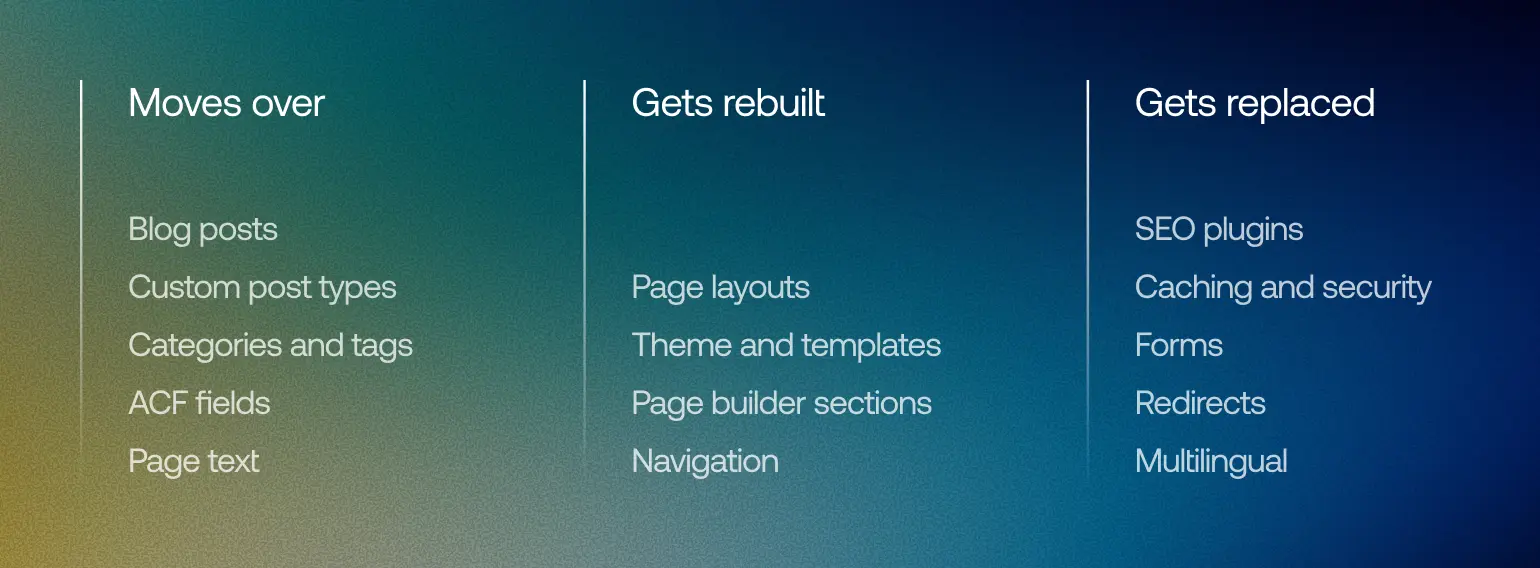
What moves, what doesn't
Posts and CMS content
Blog posts, case studies and custom post types map well to Framer CMS collections. You can import them through CSV, or with a marketplace plugin like WordPress Sync, which pulls posts, custom post types, taxonomies and ACF fields directly from your WordPress site.
Expect cleanup either way. Shortcodes, embedded blocks and leftover inline styles rarely come through clean. It's also the right moment to prune: a post with no traffic and no backlinks is usually a candidate to retire.
Pages and layouts
Page layouts don't transfer in any useful way. If the site was built with Elementor, Divi or a heavy theme, the layout lives in that builder's markup, so there's nothing worth importing. The text can come across, but the pages themselves get rebuilt in Framer, which is also the point. This is where the site actually gets better instead of just moving house.
Plugins
List every active plugin and decide what replaces it. On a typical marketing site, most of the stack simply disappears:
WordPress plugin | Framer replacement |
|---|---|
SEO (Yoast, Rank Math) | SEO settings on every page and CMS item |
Caching and performance | Built-in hosting and CDN |
Security and backups | Handled natively, with version history |
Redirection | Native redirect settings |
Forms (Contact Form 7, Gravity Forms) | Native or embedded forms |
Multilingual (WPML, Polylang) | Built-in localization |
Whatever is left on the list after that is your real risk. If a plugin does something core to the business and has no Framer equivalent, settle it before design starts.
Protecting your SEO
Framer handles the technical fundamentals well, with fast pages, clean output, automatic sitemaps and full control over metadata (more on that in Is Framer Good for SEO). None of that protects your rankings during a migration, though. What protects them is making sure every important URL Google already knows about has a sensible destination on the new site.
Build the redirect map first
Start with a full list of URLs: your SEO plugin's sitemap, a crawl of the live site, your top pages in Search Console and anything with backlinks in Ahrefs. Then decide an outcome for each one: keep it, redirect it to its new equivalent, or let it 404 if it's gone for good. Just don't send retired pages to the homepage in bulk, since Google may treat those as soft 404s.

Redirect map example
We followed the same process when Dexa moved their multilingual site from Drupal to Framer, working with their team to track old and new slugs for every language before a single redirect went live. Different platform, but the process is the same for WordPress.
In Framer, redirects live in Site Settings under Hosting. They're permanent, support wildcards for moving whole folders, and only go live when you publish.
Basic plan limitations
Framer's Basic plan doesn't include site redirects. You can technically route your domain through a proxy like Cloudflare and handle redirects there, but Framer only supports reverse proxying through an advanced hosting add-on or Enterprise, and it adds infrastructure someone has to maintain.
For a migration, that's rarely worth it. Upgrading the plan is simpler and far less fragile.
Plan beyond launch, too. Google recommends keeping redirects live for at least a year, so downgrading right after launch isn't really an option.
Watch for WordPress URL quirks
WordPress generates URLs you've probably forgotten about, and those are the ones that slip through:
Permalinks with dates in them, like /2024/03/post-name/
Category, tag and author archive pages
Files under /wp-content/uploads/, especially files other sites link to
The RSS feed at /feed/
Language versions, since every locale has its own URLs to map
Trailing slash variations, depending on the site's permalink structure
Carry the metadata across
Move titles, meta descriptions and social images for every page and post you keep. Add dedicated SEO fields to your CMS collections before importing, so you're not filling them in by hand afterwards. Then add back image alt text and any structured data your old SEO plugin generated, using Framer's custom code.
Expect a short dip
Some movement is normal even when everything is done right. Google says rankings can fluctuate while it recrawls the site, and a medium sized site can take a few weeks before the new URLs fully replace the old ones.
What isn't normal is a drop that keeps going. That usually points to missing redirects, wrong destinations, a leftover noindex or major content changes.
The migration checklist
Take a full backup of the WordPress site and database
Export your URLs, Search Console and backlink data
Audit plugins and decide what replaces each one
Decide which pages and posts to keep, merge or retire
Set up styles and components in Framer, then build the pages
Create CMS collections with SEO fields, then import content
Build the redirect map and check it line by line
Confirm your Framer plan includes redirects
QA everything on the Framer preview domain: links, forms, metadata, mobile
Switch DNS early in the week, and keep WordPress hosting until the new site is stable, so a rollback is a DNS change instead of a restore
Submit the new sitemap and monitor rankings and coverage for at least the first month
If you're keeping the same domain, you don't need Google's change of address tool. That's only for moving to a new domain.
How long it takes
For a typical startup marketing site (homepage, product and pricing pages, a handful of supporting pages and a blog), plan for four to ten weeks. Most of that time is design and build. The content import and redirects are the quick part, as long as the audit was done properly.
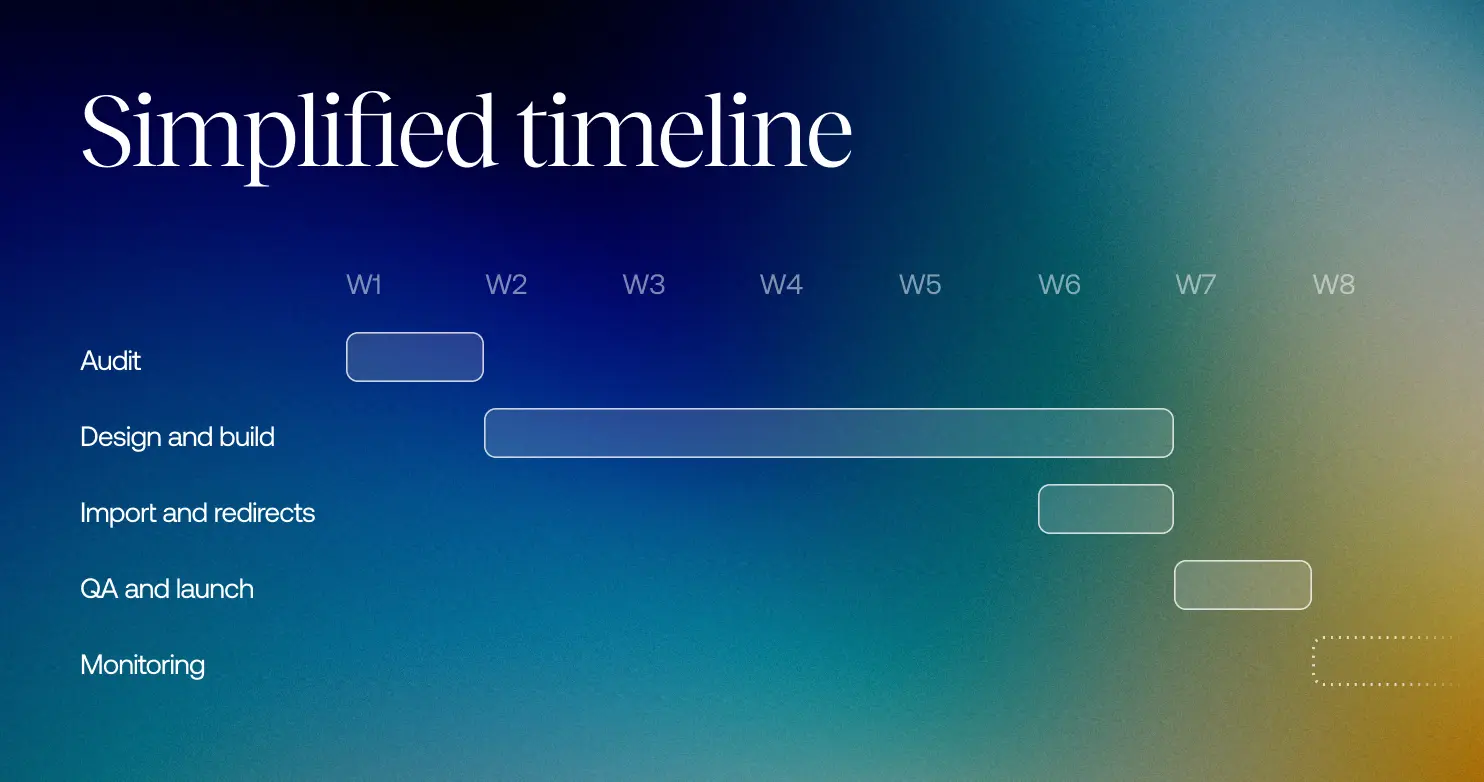
A typical migration timeline
What stretches it is usually scope, not the platform: a large blog with messy formatting, custom post types that need restructuring, multiple languages, or positioning that's still being decided mid project. A clear design brief before kickoff prevents most of that, and our pricing guide covers what a project like this typically costs.
FAQ
Will I lose SEO rankings moving from WordPress to Framer?
Not necessarily. A well executed migration can keep most of your search visibility. Short fluctuations are normal, but wrong redirects, indexing issues or major content changes can cause lasting losses.
Can I import WordPress content into Framer?
Yes. Posts, custom post types and their fields can be imported into the Framer CMS through CSV or plugins like WordPress Sync. Page layouts have to be rebuilt.
Does Framer replace WordPress plugins?
For a marketing site, mostly. SEO, caching, security, forms, redirects and localization are handled natively. E-commerce, memberships and native comments aren't.
Do Framer redirects work on every plan?
No. Site redirects aren't included on the Basic plan. Proxy workarounds exist but add infrastructure, so for a migration, a paid plan is the practical option.
How long does a WordPress to Framer migration take?
Usually four to ten weeks for a startup marketing site with a blog. Large content libraries and multiple languages add time.
Can I keep my domain when moving to Framer?
Yes, you can connect your existing domain to Framer through DNS. The URLs underneath it are what need mapping.
WordPress still powers around four in ten websites, but its share has been shrinking month after month in 2026, according to W3Techs. A lot of that ground is going to newer, design-first builders. Framer, for one, hit a $2 billion valuation last year and says around 40% of a recent Y Combinator batch launched their sites on it.
WordPress is still solid, flexible and the right call for some projects. But for a marketing site, the overhead is getting harder to justify. A migration is still largely a rebuild, and when it goes wrong, missing or incorrect redirects are one of the most common reasons rankings suffer. This guide covers when the move makes sense, what carries over, and how to switch without losing the traffic you've earned.
When migrating makes sense
Framer is the better home when your WordPress site is a marketing site. Homepage, product pages, pricing, case studies, a blog. That's exactly what Framer is built for, and it handles all of it with far less overhead.
The usual signals:
Plugin and core updates are a recurring chore, and sometimes break things
The plugin list keeps growing, and so does the security risk (Patchstack found 91% of new WordPress vulnerabilities in 2025 were in plugins)
The design is boxed in by a theme or page builder, and custom work needs a developer
Small edits in the page builder break layouts on mobile or on other pages
Performance is poor even after caching plugins
None of these is fatal on its own. Together they mean the site costs more to keep running than it should, and still looks like it came from a smaller company. In Framer, hosting, security and updates are the platform's job, and the design ceiling is much higher.
When to stay on WordPress
Plugins can stretch WordPress into courses, memberships, gated content and even a Shopify storefront, and third party tools can stretch Framer in similar directions. So the real question is whether those features are the core of your business or an add-on to a marketing site.
Stay on WordPress, or look at a dedicated platform, when the site does operational work:
Commerce is the business, with a real catalog and checkout logic
Memberships, courses or gated content are a main revenue stream, not a side feature
You run a large editorial operation with thousands of posts or deeply related content types (check the Framer CMS limits first)
The site is wired into custom systems or plugins your team depends on daily
Bolting these onto Framer works for lighter use cases. If they're central, you end up stitching several tools together to replace one system that already works.
What carries over
Very little transfers automatically, and it's better to plan for that than to discover it mid project. On WordPress, content, layout and functionality are tangled together. In Framer they separate: content goes into the CMS, layouts are rebuilt on the canvas, and functionality is either native, a plugin or an embed.
What moves, what doesn't
Posts and CMS content
Blog posts, case studies and custom post types map well to Framer CMS collections. You can import them through CSV, or with a marketplace plugin like WordPress Sync, which pulls posts, custom post types, taxonomies and ACF fields directly from your WordPress site.
Expect cleanup either way. Shortcodes, embedded blocks and leftover inline styles rarely come through clean. It's also the right moment to prune: a post with no traffic and no backlinks is usually a candidate to retire.
Pages and layouts
Page layouts don't transfer in any useful way. If the site was built with Elementor, Divi or a heavy theme, the layout lives in that builder's markup, so there's nothing worth importing. The text can come across, but the pages themselves get rebuilt in Framer, which is also the point. This is where the site actually gets better instead of just moving house.
Plugins
List every active plugin and decide what replaces it. On a typical marketing site, most of the stack simply disappears:
WordPress plugin | Framer replacement |
|---|---|
SEO (Yoast, Rank Math) | SEO settings on every page and CMS item |
Caching and performance | Built-in hosting and CDN |
Security and backups | Handled natively, with version history |
Redirection | Native redirect settings |
Forms (Contact Form 7, Gravity Forms) | Native or embedded forms |
Multilingual (WPML, Polylang) | Built-in localization |
Whatever is left on the list after that is your real risk. If a plugin does something core to the business and has no Framer equivalent, settle it before design starts.
Protecting your SEO
Framer handles the technical fundamentals well, with fast pages, clean output, automatic sitemaps and full control over metadata (more on that in Is Framer Good for SEO). None of that protects your rankings during a migration, though. What protects them is making sure every important URL Google already knows about has a sensible destination on the new site.
Build the redirect map first
Start with a full list of URLs: your SEO plugin's sitemap, a crawl of the live site, your top pages in Search Console and anything with backlinks in Ahrefs. Then decide an outcome for each one: keep it, redirect it to its new equivalent, or let it 404 if it's gone for good. Just don't send retired pages to the homepage in bulk, since Google may treat those as soft 404s.
Redirect map example
We followed the same process when Dexa moved their multilingual site from Drupal to Framer, working with their team to track old and new slugs for every language before a single redirect went live. Different platform, but the process is the same for WordPress.
In Framer, redirects live in Site Settings under Hosting. They're permanent, support wildcards for moving whole folders, and only go live when you publish.
Basic plan limitations
Framer's Basic plan doesn't include site redirects. You can technically route your domain through a proxy like Cloudflare and handle redirects there, but Framer only supports reverse proxying through an advanced hosting add-on or Enterprise, and it adds infrastructure someone has to maintain.
For a migration, that's rarely worth it. Upgrading the plan is simpler and far less fragile.
Plan beyond launch, too. Google recommends keeping redirects live for at least a year, so downgrading right after launch isn't really an option.
Watch for WordPress URL quirks
WordPress generates URLs you've probably forgotten about, and those are the ones that slip through:
Permalinks with dates in them, like /2024/03/post-name/
Category, tag and author archive pages
Files under /wp-content/uploads/, especially files other sites link to
The RSS feed at /feed/
Language versions, since every locale has its own URLs to map
Trailing slash variations, depending on the site's permalink structure
Carry the metadata across
Move titles, meta descriptions and social images for every page and post you keep. Add dedicated SEO fields to your CMS collections before importing, so you're not filling them in by hand afterwards. Then add back image alt text and any structured data your old SEO plugin generated, using Framer's custom code.
Expect a short dip
Some movement is normal even when everything is done right. Google says rankings can fluctuate while it recrawls the site, and a medium sized site can take a few weeks before the new URLs fully replace the old ones.
What isn't normal is a drop that keeps going. That usually points to missing redirects, wrong destinations, a leftover noindex or major content changes.
The migration checklist
Take a full backup of the WordPress site and database
Export your URLs, Search Console and backlink data
Audit plugins and decide what replaces each one
Decide which pages and posts to keep, merge or retire
Set up styles and components in Framer, then build the pages
Create CMS collections with SEO fields, then import content
Build the redirect map and check it line by line
Confirm your Framer plan includes redirects
QA everything on the Framer preview domain: links, forms, metadata, mobile
Switch DNS early in the week, and keep WordPress hosting until the new site is stable, so a rollback is a DNS change instead of a restore
Submit the new sitemap and monitor rankings and coverage for at least the first month
If you're keeping the same domain, you don't need Google's change of address tool. That's only for moving to a new domain.
How long it takes
For a typical startup marketing site (homepage, product and pricing pages, a handful of supporting pages and a blog), plan for four to ten weeks. Most of that time is design and build. The content import and redirects are the quick part, as long as the audit was done properly.
A typical migration timeline
What stretches it is usually scope, not the platform: a large blog with messy formatting, custom post types that need restructuring, multiple languages, or positioning that's still being decided mid project. A clear design brief before kickoff prevents most of that, and our pricing guide covers what a project like this typically costs.
FAQ
Will I lose SEO rankings moving from WordPress to Framer?
Not necessarily. A well executed migration can keep most of your search visibility. Short fluctuations are normal, but wrong redirects, indexing issues or major content changes can cause lasting losses.
Can I import WordPress content into Framer?
Yes. Posts, custom post types and their fields can be imported into the Framer CMS through CSV or plugins like WordPress Sync. Page layouts have to be rebuilt.
Does Framer replace WordPress plugins?
For a marketing site, mostly. SEO, caching, security, forms, redirects and localization are handled natively. E-commerce, memberships and native comments aren't.
Do Framer redirects work on every plan?
No. Site redirects aren't included on the Basic plan. Proxy workarounds exist but add infrastructure, so for a migration, a paid plan is the practical option.
How long does a WordPress to Framer migration take?
Usually four to ten weeks for a startup marketing site with a blog. Large content libraries and multiple languages add time.
Can I keep my domain when moving to Framer?
Yes, you can connect your existing domain to Framer through DNS. The URLs underneath it are what need mapping.
We help startups migrate from WordPress to Framer without losing the rankings they've already built.